Getting Started with Quibbix in 5 Minutes
A quick-start guide to setting up your family rewards system. Create tasks, add kids, and start earning Quibbs today.
TL;DR
Sign up free, add your kids with simple PIN codes, create tasks with Quibb values, set up rewards, and you're ready to go. The whole setup takes under 5 minutes.
Setting up Quibbix takes less than five minutes. By the end of this guide, you will have a parent account, at least one child profile, a set of tasks with Quibb values, and rewards your kids can work toward. No credit card required, no email needed for kids, and no complicated configuration. Let us walk through it step by step.
Step 1: Create Your Parent Account
Head to quibbix.org and click Sign Up. You will need:
- Your name
- An email address
- A password
Once you submit the form, you are logged in immediately and taken to the onboarding flow. There is no email verification step — you can start setting up your family right away.
Quibbix is completely free. There are no premium tiers, no ads, and no hidden costs. The features you see on day one are the same features you will have on day one thousand.
Step 2: Create Your Family
After signing up, Quibbix prompts you to create your family. Enter your family name — this can be your last name, a fun family nickname, or anything you like. This name appears on the family leaderboard and in your children’s dashboards.
When you create your family, Quibbix automatically generates a unique Family Code (for example, “PATEL-4130”). This code is important — it is how your children will find your family when they log in. Write it down or save it somewhere accessible.
Your Family Code is private to your family. Do not share it publicly. Anyone with the code can see the names of children in your family (though they cannot log in without a child’s PIN). Treat it like a family password.
Step 3: Add Your First Child
The onboarding flow immediately asks you to add your first child. You will need:
- Your child’s name — this appears on their dashboard and the leaderboard
- An avatar — Quibbix provides a library of fun, colorful avatars for kids to choose from
- A 4-digit PIN — this is how your child logs into their account (no email required)
The PIN system is designed for simplicity and age-appropriateness. Young children who cannot type an email address can still enter four numbers. Parents set the initial PIN during setup, and it is securely hashed — Quibbix never stores PINs in plain text.
You can add more children at any time from the parent dashboard. Each child gets their own profile, their own Quibbs balance, and their own task history.
Quibbix Tip
Let your kids pick their own avatar. It sounds small, but giving children ownership over their profile — even just choosing a picture — increases their engagement with the system. Kids who feel like the tool is “theirs” use it more consistently.
Step 4: Create Tasks and Set Quibb Values
Now the fun part. Tasks are the core of Quibbix — they are how your children earn Quibbs. From the parent dashboard, navigate to your child’s profile and create your first tasks.
For each task, you will set:
- Task name — keep it clear and specific (“Make your bed” not “Clean up”)
- Quibb value — how many Quibbs the task is worth when completed
How to Choose Quibb Values
There is no single right answer, but here are guidelines that work well for most families:
| Task Difficulty | Example Tasks | Suggested Quibbs |
|---|---|---|
| Quick and easy | Make bed, put away shoes, feed the cat | 1-3 Quibbs |
| Moderate effort | Set the table, take out trash, tidy room | 3-5 Quibbs |
| Significant effort | Vacuum a room, do dishes, help cook dinner | 5-10 Quibbs |
| Above and beyond | Mow the lawn, deep clean bathroom, babysit sibling | 10-20 Quibbs |
The exact numbers matter less than the relative values. When making the bed is worth 2 Quibbs and vacuuming is worth 8, children quickly understand that harder work earns more. This mirrors how compensation works in the real world.
Quibbix Tip
Start with 5-7 tasks. Too few and children run out of earning opportunities. Too many and the list feels overwhelming. You can always add more tasks later as your family settles into the routine.
Example Starter Task Lists
For ages 3-5:
- Put away toys — 2 Quibbs
- Put clothes in hamper — 1 Quibb
- Help set the table — 2 Quibbs
- Feed the pet — 2 Quibbs
- Water the plants — 1 Quibb
For ages 6-9:
- Make your bed — 2 Quibbs
- Clear your plate after meals — 1 Quibb
- Take out the trash — 3 Quibbs
- Fold and put away laundry — 5 Quibbs
- Help prepare dinner — 5 Quibbs
For ages 10+:
- Do the dishes — 5 Quibbs
- Vacuum a room — 5 Quibbs
- Clean the bathroom — 8 Quibbs
- Cook a meal — 10 Quibbs
- Mow the lawn — 10 Quibbs
For a detailed breakdown of which tasks fit each age group, check out our complete age-appropriate chore chart.
Step 5: Set Up Rewards
Rewards are what children spend their Quibbs on. This is where the magic happens — you control the economy completely. Navigate to the rewards section and create options your kids will actually want to work toward.
Great Reward Ideas by Price Tier
Low cost (5-10 Quibbs) — Instant gratification:
- 15 minutes of extra screen time
- Choose the bedtime story
- Pick the afternoon snack
- Extra 10 minutes before bed
Medium cost (20-40 Quibbs) — A few days of effort:
- Movie night pick (they choose the film)
- Special dessert after dinner
- Skip one chore of their choice
- 30 minutes of extra gaming time
High cost (50-100 Quibbs) — Real savings goals:
- Trip to favorite restaurant
- Friend sleepover
- New book or small toy
- Choose the family weekend activity
- Stay up an hour late on a weekend
The most effective rewards are experiences, not things. Research consistently shows that experiential rewards (movie night, restaurant trip, choosing the family activity) create stronger positive associations and longer-lasting motivation than material rewards. Kids remember the sleepover they earned for months; they forget the small toy in days.
Designing an Effective Reward Menu
A well-designed reward menu has at least one option at each tier. This ensures that:
- New users get a quick win. A child who earns their first reward within 1-2 days is hooked. If the cheapest reward requires two weeks of saving, they may lose interest before they ever experience the payoff.
- Long-term goals stay motivating. Having a “big” reward on the horizon gives children something to work toward even after they have purchased the small rewards.
- There is always a reason to earn. If all rewards cost the same amount, there is no incentive to keep earning after a purchase. Multiple tiers keep the system engaging.
Step 6: Show Your Kids How It Works
With tasks and rewards in place, it is time to get your kids involved. Here is how the child login flow works:
- Go to the Quibbix child login page.
- Enter the Family Code (for example, “PATEL-4130”). The system shows the list of children in the family.
- Select their name from the list.
- Enter their 4-digit PIN. They are logged in.
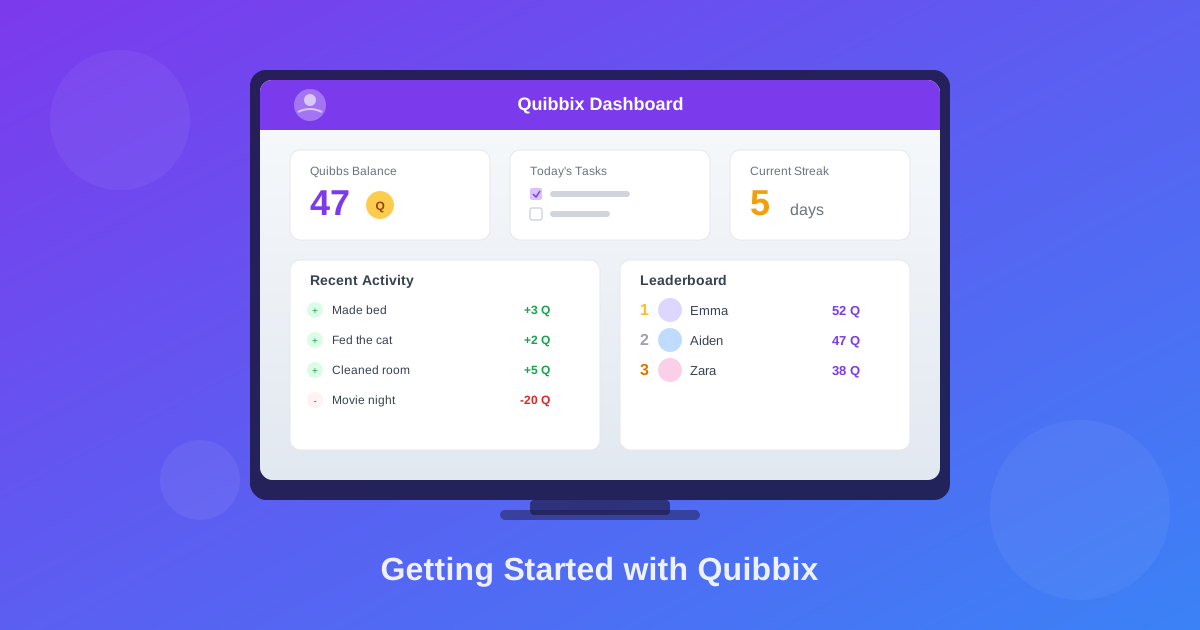
Once logged in, children see their dashboard with:
- Their current Quibbs balance — prominently displayed at the top
- Available tasks — what they can do to earn more
- Recent activity — a log of Quibbs earned and spent
- Badges — achievements they have unlocked through consistency and milestones
How Task Completion Works
When a child completes a task in real life, the parent awards the Quibbs from the parent dashboard. Select the child, find the task, and confirm the award. The child’s balance updates automatically.
If the child has their dashboard open, they will see their balance increase in real time — complete with a confetti animation for positive transactions. This instant visual feedback is a powerful motivator, especially for younger kids.
Quibbix Tip
Make awarding Quibbs a shared moment. Instead of silently tapping your phone, call your child over: “You finished your chores — let’s add your Quibbs!” Watching the number go up together turns a digital transaction into a shared celebration.
How Does the Leaderboard Work?
For families with multiple children, the leaderboard adds a layer of friendly competition. It shows a weekly ranking of all children in the family based on Quibbs earned that week.
The leaderboard resets weekly, which means:
- Every child gets a fresh start every week. A bad week does not define the next one.
- Consistent effort is rewarded. The child who does a little every day often beats the child who does a lot in one burst.
- It is about earning, not hoarding. The leaderboard tracks Quibbs earned, not total balance, so spending does not hurt your ranking.
The leaderboard is designed for motivation, not stress. If you notice competition becoming negative — siblings getting upset about rankings — consider hiding it temporarily or reframing it as “everyone vs. last week’s scores” rather than sibling vs. sibling.
How Do Badges Work?
Badges are automatic achievements that reward milestones and consistency. Children earn them without any parent intervention — Quibbix evaluates badge criteria after every positive transaction.
Badge examples include:
- First Quibb — earned when a child completes their very first task
- Earning milestones — reaching cumulative Quibb totals (50, 100, 500, etc.)
- Transaction milestones — completing a certain number of tasks total
- Daily streaks — completing tasks on consecutive days
Badges appear on the child’s dashboard and serve as a visual record of their progress over time. They tap into a different motivational lever than Quibbs — badges satisfy the need for recognition and achievement, while Quibbs satisfy the need for autonomy and choice.
Tips for Long-Term Success
Getting started is the easy part. Here is how to make Quibbix work for your family over the long term:
Review and Adjust Monthly
Sit down with your kids once a month and review the system together. Ask:
- “Are any tasks too easy or too hard?”
- “Do the rewards still feel exciting?”
- “Should we add new tasks or remove old ones?”
This keeps the system fresh and gives children a sense of ownership over the process.
Let Kids Propose Changes
When a child says “I think cleaning the bathroom should be worth more Quibbs,” they are negotiating — a real-world skill. Take these conversations seriously. If their argument makes sense, adjust the value. They will feel heard, and their engagement will increase.
Add Complexity Gradually
Start simple. Once your family is comfortable with basic earning and spending, consider:
- Bonus Quibbs for completing all daily tasks (consistency bonuses)
- Premium tasks that are available only on weekends
- Savings challenges where the family collectively saves toward a group reward
Connect to Real Money (When Ready)
For older children, consider bridging Quibbs to real-world money. One approach: at the end of each month, convert a portion of earned Quibbs to a small real allowance. This creates a direct connection between the habits they are building digitally and real financial outcomes. For a deeper dive on this approach, read our guide on how virtual currency teaches kids real money skills.
You Are Five Minutes Away from a Better System
That is genuinely all it takes. Sign up, add your kids, create some tasks and rewards, and you are running a family economy that teaches responsibility, financial literacy, and the value of effort — all while reducing the daily friction of getting kids to help around the house.
Quibbix Tip
Start today. Not next Monday, not next month. The research is clear: the best chore and reward systems are the ones that actually get implemented. Head to quibbix.org, sign up, and have your family running on Quibbix before bedtime tonight.
Teach kids about money the fun way
Set up your family rewards system in under 2 minutes.
Frequently Asked Questions
Is Quibbix free?
Yes, Quibbix is completely free. There are no premium tiers, no ads, and no hidden costs. We believe every family deserves access to tools that make parenting easier.
How do kids log in to Quibbix?
Kids use a simple PIN-based login — no email required. Parents create a 4-digit PIN for each child. Kids go to the child login page, select their name, and enter their PIN.
Can I use Quibbix for multiple children?
Absolutely! Quibbix is designed for families. Add as many children as you need, customize tasks and rewards per child, and use the family leaderboard for friendly competition.
Father and founder of Quibbix. Passionate about building tools that help families thrive through positive reinforcement and financial literacy.
Turn screen time into learning time
Quibbix helps families build healthy money habits together. Free to start.
Get Started Free